 NetMeter
Know how much of your data plan is left.
NetMeter lives in the macOS menu bar and shows the live rate, any time range, per-app usage, and progress against your monthly cap. It needs no root, no kernel extension and no special permissions.
brew tap omerdikyol/netmeter
brew trust omerdikyol/netmeter
brew install --cask netmeter
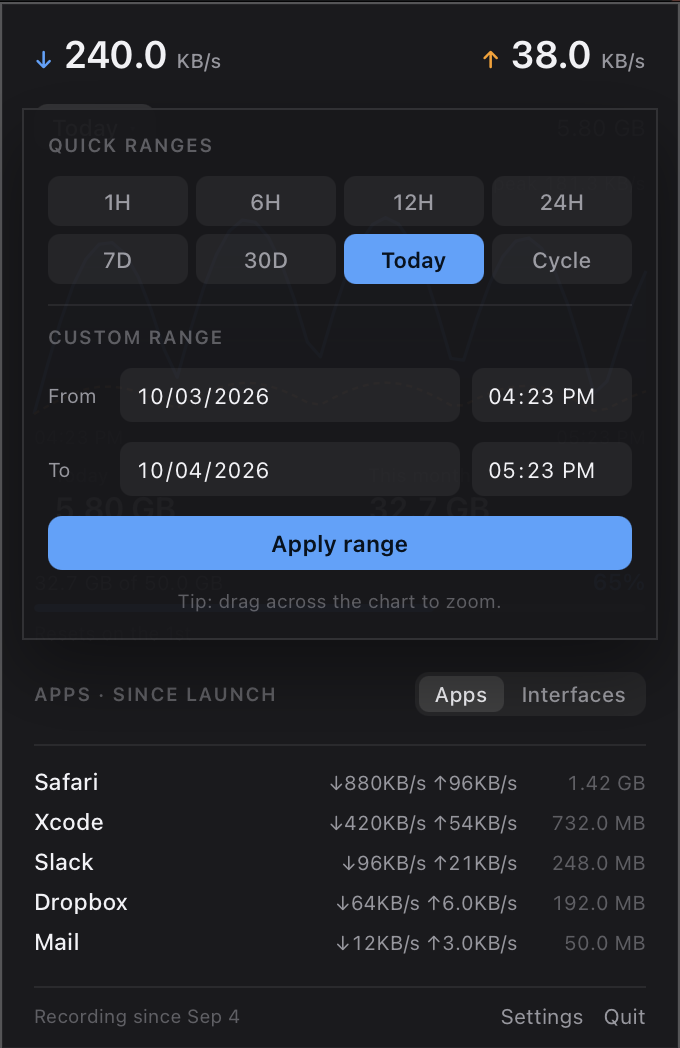
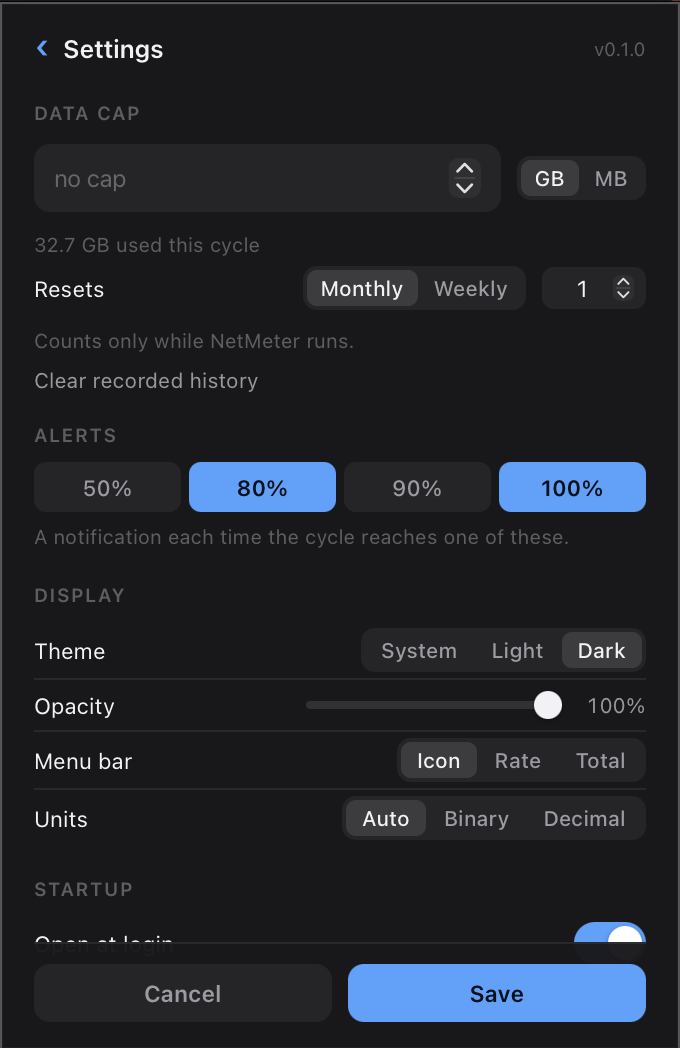
This is NetMeter's real panel, running in your browser on made-up traffic. Everything in it works: drag across the graph to zoom, or change the data cap in settings.
Why another one
Built around a data cap, with nothing to grant.
Stats and iStat Menus already show network traffic. NetMeter is for when the question is not how fast, but how much is left.
It is built around a data cap
Set your plan's size and reset day, and the panel shows how much of it is gone and when it renews, with notifications as you cross the thresholds you picked.
It needs no privileges
No Accessibility permission, no root, no kernel extension, no network filter. It reads the same per-interface counters Activity Monitor does, and nettop for per-app numbers.
Pick the thresholds you care about. NetMeter sends a notification as the cycle crosses each one.
What it shows
Everything you need, in one small panel.
- Live rate
- Download and upload, updated every second
- Any time range
- 1H to 30D, Today, Cycle, a From–To picker, or drag across the graph to zoom
- Per app
- The busiest processes since launch, or per-interface totals for the range
- Data cap
- Progress against your plan, a reset day, and threshold notifications
- Menu bar
- A quiet activity glyph, the live rate, or the cycle total
- Appearance
- Light, dark, or follow the system, with a panel opacity slider
- Private
- A SQLite file on your Mac. No accounts, nothing uploaded
- Command line
netmeter report --range cyclereads the same history
Install
Running in under a minute.
brew tap omerdikyol/netmeter
brew trust omerdikyol/netmeter   # Homebrew asks for third-party taps to be trusted
brew install --cask netmeter
Download NetMeter-macos-universal.dmg, open it, and drag NetMeter into Applications. There is a .zip on the releases page too. Builds are signed and notarized, so it opens normally.
git clone https://github.com/omerdikyol/netmeter
cd netmeter
cargo build --release          # Rust 1.80 or newer
packaging/macos/bundle.sh
open dist/NetMeter.app
Left-click the menu bar icon for the panel, right-click for Settings and Quit. If you use a menu bar manager such as Ice or Bartender and the icon does not appear, move NetMeter to the always-visible section.
Counts while it runs
Totals cover the time NetMeter was open, and the panel says since when. Turn on launch at login to avoid gaps.
Honest per-app numbers
Per-app usage comes from nettop, sampled and diffed, so it only counts what happened while the app was running.
macOS only, for now
The core crate is platform-neutral. The panel's webview needs work on Linux, and Windows has not been tried.